Upgrade CSM and Additional Products with IUF
Note: The CSM upgrade to CSM 1.6 is done with IUF.
This procedure is used when performing an upgrade of Cray System Management (CSM) along with additional HPE Cray EX software products at the same time. This procedure would be used when upgrading from one HPC CSM Software Recipe release to another.
This procedure is not used to perform an initial install or upgrade of HPE Cray EX software products when CSM itself is not being upgraded. See Install or Upgrade Additional Products with IUF for that procedure.
This procedure streamlines the rollout of new images to management nodes. These images are based on the new images provided by the CSM product and customized by the additional HPE Cray EX software products, including the User Services Software (USS) and Slingshot Host Software (SHS).
All stages of iuf are executed in this option. All of the new product software provided in the
recipe release is deployed and all management NCNs and managed
compute nodes and application nodes are
rebooted to new images and Configuration Framework Service (CFS)
configurations. Manual operations are documented for procedures that are not currently managed by IUF.
The upgrade workflow comprises the following procedures. The diagram shows the workflow and the steps below it provide detailed instructions which must be executed in the order shown.
The CSM upgrade steps are run automatically, either directly through IUF stages or by a hook automatically executed at the beginning or end of an IUF stage.
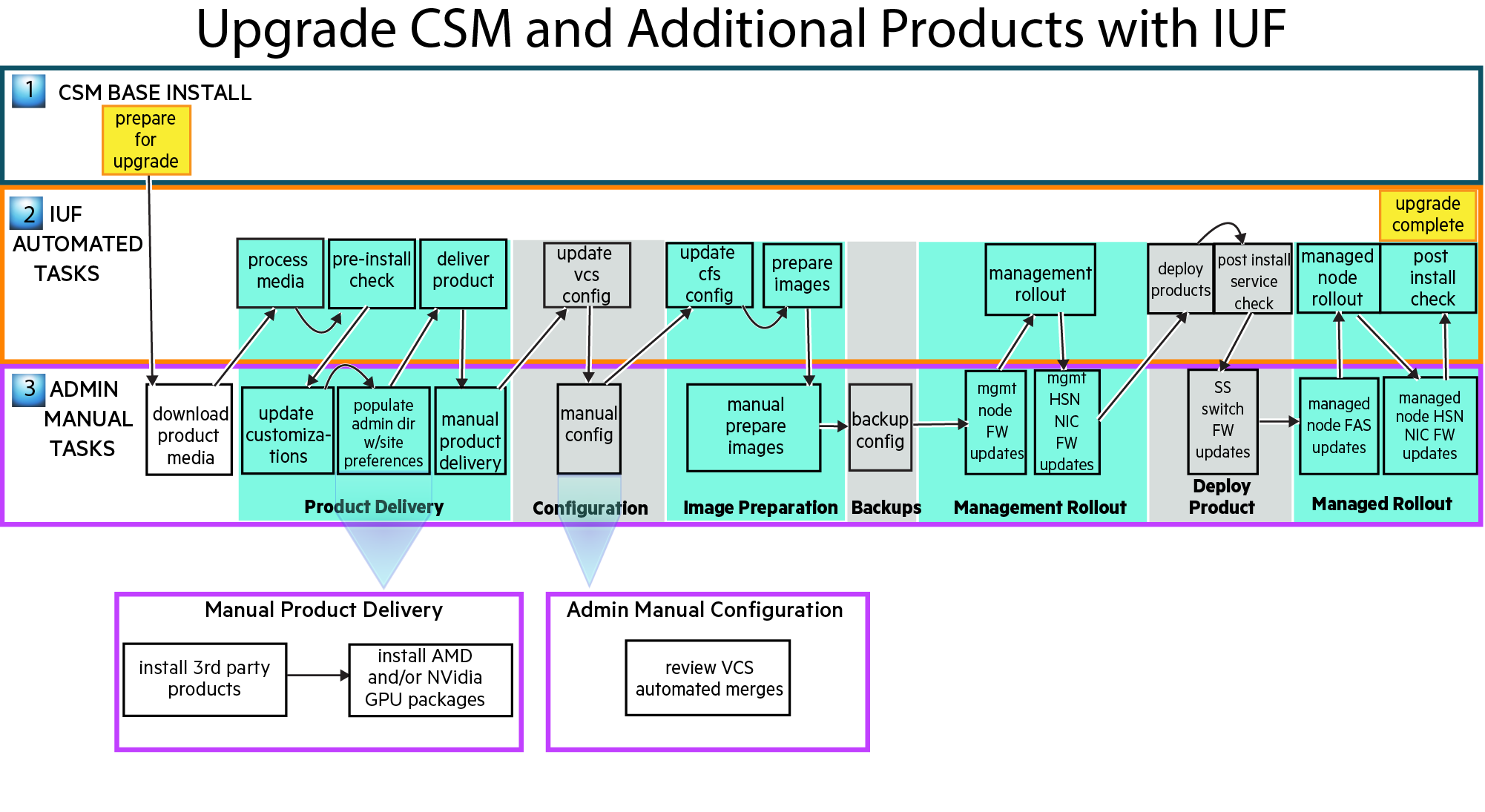
-
Read the Important Notes section of the CSM 1.5.0 or later to 1.6 Upgrade Process documentation.
-
Prepare for Upgrade to Next CSM Major Version in the CSM 1.5 documentation.
-
Prepare for the upgrade procedure and download product media
-
Follow the IUF Prepare for the Install or Upgrade instructions to set environment variables used during the upgrade process.
-
Download the desired HPE product media defined by the HPC CSM Software Recipe to
${MEDIA_DIR}, which was defined in the previous step.
-
-
Product delivery
Follow the IUF Product Delivery instructions.
SMA 1.10.15 and later includes an upgraded LDMS that introduces an incompatibility with configuration files used in prior versions.
- When upgrading from an older SMA version to a version with this new LDMS, the administrator must change the configuration files.
- A workaround is presented as an Action in the deliver-product stage in the IUF Stage Details for SMA section of the HPE Cray Supercomputing EX System Monitoring Application Installation Guide.
-
Configuration
Follow the IUF Configuration instructions.
-
Image preparation
Follow the IUF Image Preparation instructions.
-
Backup
Follow the IUF Backup instructions.
-
Management rollout
Follow the IUF Management Rollout instructions.
-
Deploy product
Follow these IUF instructions in order:
-
Managed rollout
Follow the IUF Managed Rollout instructions.
The IUF upgrade workflow is now complete. Exit any typescript sessions created during the upgrade procedure and remove any installation artifacts, if desired.