Node Management Workflows
The following workflows are high-level overviews of node management tasks. These workflows depict how services interact with each other during node management, and help to provide a deeper understanding of how the system functions.
The workflows and procedures in this section include:
Components involved in adding or removing nodes
Both of these workflows are based on the interaction of the System Layout Service (SLS) with other hardware management services (e.g. HSM, HBTD, HMNFD, MEDS).
Mentioned in these workflows:
- System Layout Service (SLS) serves as a “single source of truth” for the system design. It details the physical locations of network hardware, compute nodes and cabinets. Further, it stores information about the network, such as which port on which switch should be connected to each compute node.
- Hardware State Manager (HSM) monitors and interrogates hardware components in an HPE Cray EX system, tracking hardware state and inventory information, and making it available via REST queries and message bus events when changes occur.
- HMS Notification Fanout Daemon (HMNFD) receives component state change notifications from the HSM. It fans notifications out to subscribers (typically compute nodes).
- Endpoint Discovery Service (HMS Discovery/MEDS) manages initial discovery, configuration, and geolocation of Redfish-enabled BMCs. It periodically makes Redfish requests to determine if hardware is present or missing.
- Heartbeat Tracker Service (HBTD) listens for heartbeats from components (mainly compute nodes). It tracks changes in heartbeats and conveys changes to the HSM.
Add nodes
Use cases for adding nodes
Administrator permanently adds select compute nodes to expand the system.
Components involved in adding nodes
See Components involved in adding or removing nodes.
Workflow overview for adding nodes
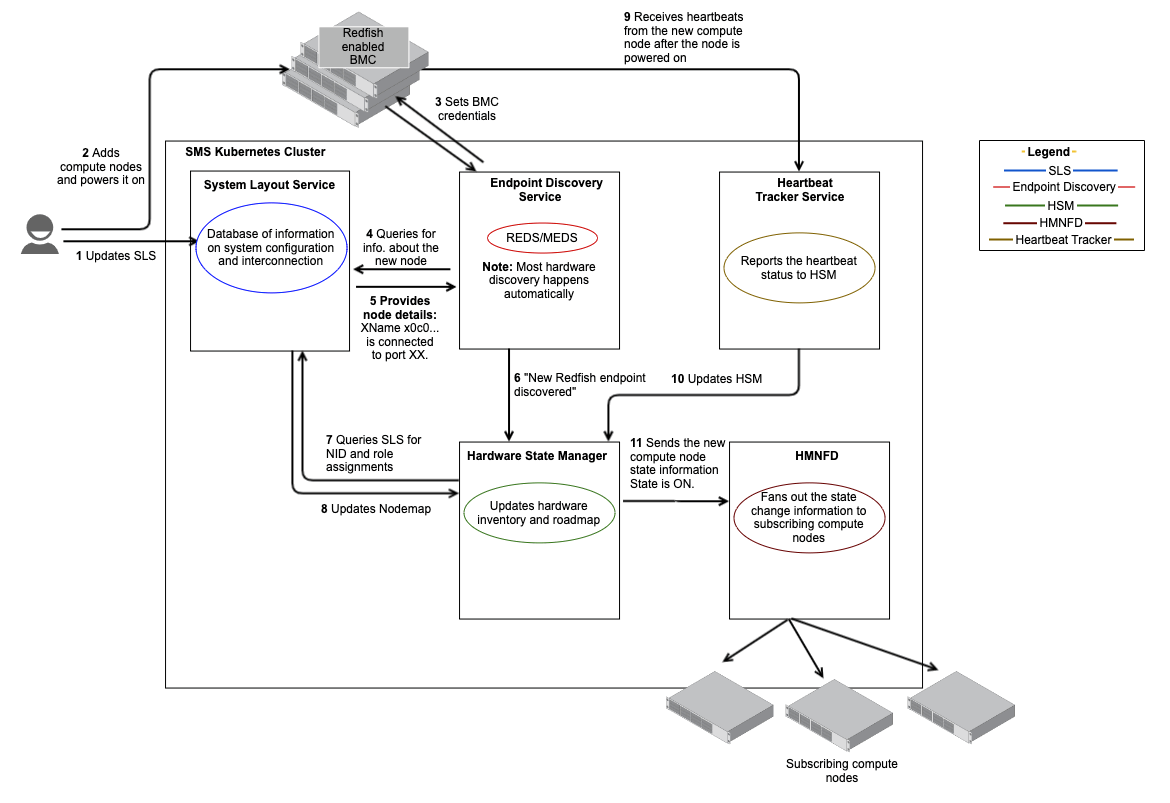
The following sequence of steps occur during this workflow.
-
Administrator updates SLS.
Administrator creates a new hardware entry for the select component names (xnames) in SLS. Administrator enters the node component names (xnames) in the SLS input file.
-
Administrator adds compute nodes.
The administrator physically adds select compute nodes and powers them on. Because the nodes are unknown, the DHCP and TFTP servers give them the special initialization RAM disk. The compute nodes performs local configuration.
The remaining steps occur automatically as different APIs interact with each other.
-
HMS Discovery/MEDS to SLS and HSM.
For Cray EX hardware:
-
MEDS reaches out to SLS for Mountain/Hill chassis that exist in the system.
-
Calculate algorithmic MAC address for each possible controller (chassis controller, node controller, and switch controller) in the chassis, based off the device xname.
-
Create Ethernet interface in HSM for each possible controller.
For example, the following CLI command displays the Ethernet interface in HSM for
x1000c0s0b0.cray hsm inventory ethernetInterfaces list --component-id x1000c0s0b0 --format tomlExample output for HSM Ethernet interface that was created by MEDS for node controller
x1000c0s0b0:Example output:
[[results]] ID = "0203e8003000" Description = "" MACAddress = "02:03:e8:00:30:00" LastUpdate = "2022-08-22T12:34:36.1641742Z" ComponentID = "x1000c0s0b0" Type = "NodeBMC" [[results.IPAddresses]] IPAddress = "" -
Controller requests an IP address from KEA via DHCP.
-
KEA’s DHCP helper updates the Ethernet interface in HSM with a IP address.
For example, the following CLI command displays the Ethernet interface in HSM for
x1000c0s0b0.cray hsm inventory ethernetInterfaces list --component-id x1000c0s0b0 --format tomlExample output for an HSM Ethernet interface for node controller
x1000c0s0b0, after KEA’s DHCP helper has updated it with an IP address:[[results]] ID = "0203e8003000" Description = "" MACAddress = "02:03:e8:00:30:00" LastUpdate = "2022-08-23T14:50:07.188282Z" ComponentID = "x1000c0s0b0" Type = "NodeBMC" [[results.IPAddresses]] IPAddress = "10.104.0.19" -
For all possible controllers, MEDS performs a GET request for their Redfish root (e.g.
https://x1000c0s0b0/redfish/v1).Once a 200 status code is received, MEDS configures NTP on the controller.
-
For standard 19 inch rack hardware:
-
HMS Discovery retrieves all Ethernet interfaces from HSM without a component ID set.
-
HMS Discovery queries SLS for
MgmtSwitch(sw-leaf-bmc-XXX) switches present in the system. -
HMS Discovery retrieves the MAC address table from each
MgmtSwitchvia SNMP. -
For each Ethernet interface without a component ID set:
-
Search through the retried MAC address tables to identify which switch port the MAC address is connected to.
-
Query SLS for a corresponding
MgmtSwitchConnectorto identify what is connected to the switch port.For example, determine what node controller is connected to port 35 on
leaf-bmcswitchx3000c0w35:cray sls hardware describe x3000c0w22j35 --format tomlExample output:
Parent = "x3000c0w22"
Xname = "x3000c0w22j35"
Type = "comptype_mgmt_switch_connector"
Class = "River"
TypeString = "MgmtSwitchConnector"
LastUpdated = 1689284887
LastUpdatedTime = "2023-07-13 21:48:07.146163 +0000 +0000"

[ExtraProperties]
NodeNics = [ "x3000c0s19b3",]
VendorName = "ethernet1/1/35"
The node controller
x3000c0s19b3is connected to switch port 35 on switchx3000c0w35.
-
-
-
-
HMS Discovery/MEDS to HSM.
Discovery services update HSM about the new Redfish endpoint for the node (e.g. xname and credentials).
-
HSM to SLS.
HSM queries SLS for NID and role assignments for the new node.
-
SLS to HSM.
HSM updates the node map based on information received from SLS.
-
Node to KEA.
Node requests a Node Management Network (NMN) IP address via DHCP when it boots.
-
KEA to HSM.
KEA’s DHCP helper updates the node’s MAC address in its HSM Ethernet interfaces.
-
Node to HBTD.
The Heartbeat Tracker Service receives heartbeats from the new compute node after the node is powered on.
-
HBTD to HSM.
The Heartbeat Tracker Service report the heartbeat status to HSM.
-
HSM to HMNFD.
HSM sends the new compute node state information with
StateasONto HMNFD. HMNFD fans out these notifications to the subscribing compute nodes.
Remove nodes
Use cases for removing nodes
Administrator permanently removes select compute nodes to contract the system.
Components involved in removing nodes
See Components involved in adding or removing nodes.
Workflow overview for removing nodes
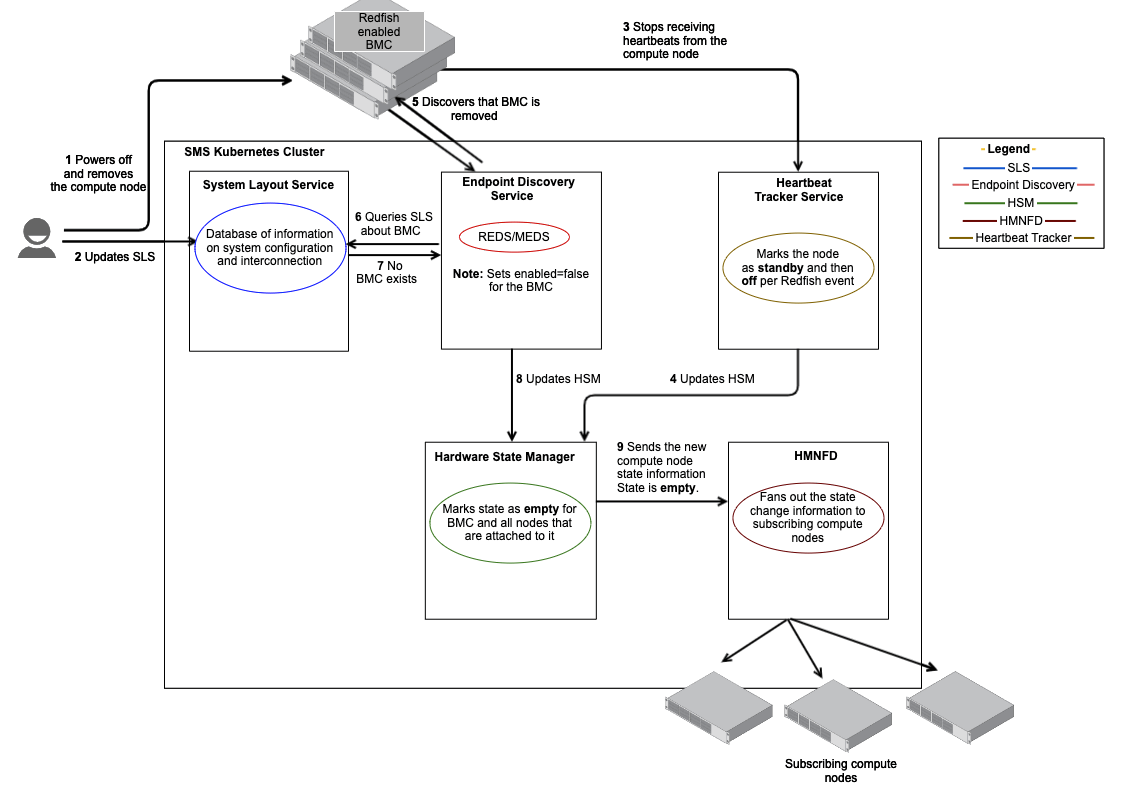
The following sequence of steps occur during this workflow.
-
Administrator updates SLS.
Administrator deletes the node entries with the specific component name (xname) from SLS. Note that if deleting a parent object, then the children are also deleted from SLS. If the child object happens to be a parent, then the deletion can cascade down levels. If deleting a child object, it does not affect the parent.
-
Administrator physically removes the compute nodes.
The administrator powers off and physically removes the compute nodes.
-
No heartbeats in HBTD.
The Heartbeat Tracker Service stops receiving heartbeats and updates the node status, first as
Standbyand thenOff, as per Redfish event.Standbystatus implies that the node is no longer ready and presumed dead. It typically means that the heartbeat is lost.Offstatus implies that the location is not populated with a component. -
Administrator to HSM.
Administrator informs the HSM that the BMC Redfish endpoints for the nodes were removed by marking them disabled. HSM marks the state of BMCs and the nodes as
Empty.Emptystate implies that the location is not populated with a component. -
HSM to HMNFD.
HSM sends the compute node state information with
StateasEmptyto HMNFD. HMNFD fans out this notification to the subscribing compute nodes. -
Administrator to HSM.
For the removed node, the administrator removes the following from the HSM:
- Redfish endpoint
- Corresponding components
- Ethernet interfaces